This guide shows you how to make the most of WCF (Windows Communication Foundation) with end-to-end application scenarios, it shows you how to design and implement authentication and authorization in WCF, how to improve the security of your WCF services through prescriptive guidance including guidelines, Q&A, practices at a glance, and step-by-step how tos.
Showing posts with label Web Services. Show all posts
Showing posts with label Web Services. Show all posts
August 19, 2008
March 30, 2007
WCF Vs ASMX/Remoting/ES
This MSDN article provides a high-level performance comparison between Windows Communication Foundation (WCF) and existing Microsoft .NET distributed communication technologies.
This article says, WCF is 25%—50% faster than ASP.NET Web Services, and approximately 25% faster than .NET Remoting. Comparison with .NET Enterprise Service is load dependant, as in one case WCF is nearly 100% faster but in another scenario it is nearly 25% slower. For WSE 2.0/3.0 implementations, migrating them to WCF will obviously provide the most significant performance gains of almost 4x.
March 20, 2007
Web Service Pattern
Here are some resources on Web Service Software Factory -
- Web Service Software Factory - Pattern and Practices.
- MSDN Architecture Webcast: Introducing the Web Service Software Factory (Level 200)
- Web Service Software Factory Community
February 26, 2007
Client-Side Web Service Calls with AJAX Extensions
This MSDN article discusses on Calling Web Services with AJAX.
August 13, 2006
The Future of ASP.NET Web Services in the Context of the Windows Communication Foundation
This is great article on "The Future of ASP.NET Web Services in the Context of the Windows Communication Foundation" by Craig McMurtry. This article mainly discusses on WS and WCF, their comparision/diffrences and strategy for adopting WCF.
The ASP.NET Web services tools are solely for building Web services, the Windows Communication Foundation provides tools for use in any circumstance where software entities must be made to communicate with one another. Even for Web service development projects, the Windows Communication Foundation supports more Web service protocols than ASP.NET Web services support. Those protocols provide for more sophisticated solutions involving, amongst other things, reliable sessions and transactions. The recommended course of action in most cases is to adopt the Windows Communication Foundation for new development, while continuing to maintain existing ASP.NET Web service applications. That course of action yields the benefits of the Windows Communication Foundation, while sparing the cost of migrating existing applications. New Windows Communication Foundation applications will be able to use existing ASP.NET Web services, and can co-exist with existing ASP.NET applications. The Windows Communication Foundation can even be used to program new operational capabilities into existing ASP.NET applications by virtue of the Windows Communication Foundation's ASP.NET compatibility mode.
August 11, 2006
How to convert existing ASMX service to WCF?
Suppose you have asmx webservice code as below:
[WebService(Namespace=”http://tempuri.org/asm”)]
public class TestService : System.Web.Services.WebService{
[WebMethod]
public string HelloWorld() {
return "Hello World";
}
}
Steps to convert above asmx service in wcf are:
1. Create a .svc file in your virtual directory.
Create a .svc file in your virtual directory that contains the following declaration same as asmx file for traditional web service:
<%@ServiceHost"Language=”C#” Service=”TestService” %>
2. Add WCF attributes.
Add [ServiceContract] to the classes you want to expose through WCF, and [OperationContract] to the methods as shown:
[ServiceContract(Namespace=”http://tempuri.org/asm/wcf”)]
[WebService(Namespace=”http://tempuri.org/asm”)]
public class TestService : System.Web.Services.WebService{
[WebMethod]
[OperationContract]
public string HelloWorld() {
return "Hello World";
}
}
3. Modify web.config file
Add following code in web.config file to add an HTTP binding for your service:
<system.serviceModel>
<services>
<service type=”TestService”>
<endpoint binding=”basicHttpBinding” contract=”TestService” /> </service>
</services>
</system.serviceModel>
August 08, 2006
All About ASMX 2.0, WSE 3.0, and WCF
There is good article which explains all About ASMX 2.0, WSE 3.0, and WCF available on MSDN magazine by Aaron Skonnard. Particularly I like Figure 4 which shows comparison table.
Service Station: All About ASMX 2.0, WSE 3.0, and WCF -- MSDN Magazine, January 2006
Q What features does WCF provide for developers that ASMX 2.0 and WSE 3.0 don't?
A ASMX 2.0 and WSE 3.0 provide many key features that some developers mistakenly believe are unique to WCF. For example, both stacks provide a similar attribute-based programming model where you can author service contracts on .NET interface definitions (see the first question and answer in this column). Both stacks provide transport-neutral SOAP implementations that ship with multiple transport channels and custom transport hooks. Both stacks allow for hosting services in any Windows-based application (through SoapReceivers in WSE or ServiceHost in WCF). Both stacks provide multiple message encodings, including the two most widely supported: XML 1.0 and Message Transmission Optimization Mechanism (MTOM). And both stacks provide support for message-based security, configurable via simple configuration elements (turnkey security profiles). The table in Figure 4 summarizes how the stacks compare.
The main area where the stacks differ is in their support for the various WS-* specifications. WSE 3.0 only supports the security framework while WCF supports the security, reliable messaging, and transaction frameworks. And as the table illustrates, WCF also provides more local processing behaviors and customization hooks. Virtually every layer in the WCF object model is extensible via code, attributes, or configuration.
Ultimately, WCF offers a more complete development framework that has been designed from the ground up around the various Web services protocols. Still, you can have a very similar experience today if you use ASMX 2.0 plus WSE 3.0. And the outlook for future migration looks promising.
July 17, 2006
Some Technical Terms (Mostly Web / Service related)
Here are some technical terms mostly related to web or web service.
BPEL
Business Process Execution Language (or BPEL, pronounced 'bipple', or 'bee-pell'), is a business process modeling language that is executable. BPEL is an Orchestration language.
Origins of BPEL can be traced to WSFL and XLANG. It is serialized in XML and aims to enable programming in the large.
WSFL
Web Services Flow Language (WSFL) is an XML language proposed by IBM to describe the composition of Web services. WSFL has been superseded by BPEL.
XLang
XLang is an extension of the WSDL such that "an XLANG service description is a WSDL service description with an extension element that describes the behavior of the service as a part of a business process"
POX
Plain Old XML (POX) is a term used to describe basic XML, sometimes mixed in with other, blendable specifications like XML Namespaces, Dublin Core, XInclude and XLink. People typically use the term as a contrast with complicated, multilayered XML specifications like those for Web Services or RDF.
Workflow
Workflow at its simplest is the movement of documents and/or tasks through a work process. More specifically, workflow is the operational aspect of a work procedure: how tasks are structured, who performs them, what their relative order is, how they are synchronized, how information flows to support the tasks (wordflow) and how tasks are being tracked.
RSS
RSS(Really Simple Syndication) is a family of web feed formats used to publish frequently updated digital content, such as blogs, news feeds or podcasts.
XPDL
The XML Process Definition Language (XPDL) is a format standardized by the Workflow Management Coalition to interchange Business Process definitions between different workflow products like modeling tools and workflow engines. XPDL defines a XML schema for specifying the declarative part of workflow.
XPDL is designed to exchange the process design, both the graphics and the semantics of a workflow business process. XPDL contains elements to hold the X and Y position of the activity nodes as well as the coordinates of points along the lines that link those nodes. This distinguishes XPDL from BPEL which is also a process definition format, but BPEL focuses exclusively on the executable aspects of the process. BPEL does not contain elements to represent the graphical aspects of a process diagram.
REST
REST (representational state transfer) is an approach for getting information content from a Web site by reading a designated Web page that contains an XML (Extensible Markup Language) file that describes and includes the desired content. For example, REST could be used by an online publisher to make syndicated content available. Periodically, the publisher would prepare and activate a Web page that included content and XML statements that described the content. Subscribers would need only to know the URL (Uniform Resource Locator) for the page where the XML file was located, read it with a Web browser, interpret the content data using the XML information, and reformat and use it appropriately (perhaps in some form of online publication).
POX is different from REST in that the latter refers to a style for communication protocols, while the former only refers to an information format style. REST could be seen as POX over HTTP with some peculiarities.
Web2.0
Web 2.0, a phrase coined by O'Reilly Media in 2004, refers to a perceived second-generation of Web-based services—such as social networking sites, wikis, communication tools, and folksonomies—that emphasize online collaboration and sharing among users. O'Reilly Media used the phrase as a title for a series of conferences, and it has since become widely adopted.
SAAS
Software as a service (SaaS) is a model of software delivery where the software company provides maintenance, daily technical operation, and support for the software provided to their client. SaaS is a model of software delivery rather than a market segment; it assumes the software is delivered over the internet. Software can be delivered using this method to any market segment, from home consumers to corporations.
JSON
JSON (JavaScript Object Notation) is a lightweight data-interchange format. It is easy for humans to read and write. It is easy for machines to parse and generate. It is based on a subset of the JavaScript Programming Language
ATOM
The name Atom applies to a pair of related standards. The Atom Syndication Format is an XML language used for web feeds, while the Atom Publishing Protocol (APP for short) is a simple HTTP-based protocol for creating and updating Web resources.
XINS
XML Interface for Network Services (XINS) is an open source technology for definition and implementation of internet applications, which enforces a specification-oriented approach.
WSCL
The Web Service Conversation Language (WSCL) proposal defines the overall input and output message sequences for one web service using a finite state automaton FSA over the alphabet of message types.
XML-RPC
XML-RPC is a remote procedure call protocol which uses XML to encode its calls and HTTP as a transport mechanism. It is a very simple protocol, defining only a handful of data types and commands, and the entire description can be printed on two pages of paper. This is in stark contrast to most RPC systems, where the standards documents often run into the thousands of pages and require considerable software support in order to be used.
WS-MetadataExchange
One of many Web Service specifications, WS-MetadataExchange deals with the exchange of information about a Web Service. It is a protocol used by a web service to describe itself.
WSML
The Web Service Modeling Language WSML is a language for the specification of ontologies and different aspects of Web services. In this respect WSML provides a syntax and semantics for the Web Service Modeling Ontology WSMO. WSML uses well-known logical formalisms in order to enable the description of various aspects related to Semantic Web Services.
WSMX
WSMX (Web Service Modelling eXecution environment) is the reference implementation of WSMO (Web Service Modelling Ontology). It is an execution environment for business application integration where enhanced web services are integrated for various business applications. The aim is to increase business processes automation in a very flexible manner while providing scalable integration solutions.
July 07, 2006
Invoking web service without using proxy
This article created for someone but publishing here.......
Abstract
Traditionally, whenever any client application needs to invoke a web service it uses a proxy class generated using web service description language (WSDL). However there are certain situations where traditional approach is obsolete. This article discusses such situations where web service proxy is not much useful. Moreover this article demonstrates a way for invoking the web service without creating a proxy class. You can use example in this article to create a generic assembly which can be used with any web service without need for creating or using a proxy class.
Introduction
In this article you will see how to invoke web service without using a proxy class. Normally, whenever any client needs to access a web service, the first step is to create a proxy class. This proxy class can be generated using different utilities like WSDL.EXE or Visual Studio .NET using Web Service Description Language (WSDL). In VS .NET, when you add a new web reference, a proxy class is automatically created for your client application. This is a very simple way to access web service where WSDL plays an important role.
However there are certain situations where you can not create web service proxy or proxy is not much helpful to implement the complete solution.
In this article you will see a complete example which will demonstrate how to invoke web service without using a proxy class. In order to invoke web service without a proxy class, it uses WebRequest class and sends entire SOAP message as an HTTP request. From this article you will learn basics of WebRequest and its associated class and how to use them to invoke web service. Finally you will create an assembly which can be used with any web service without need of the proxy class.
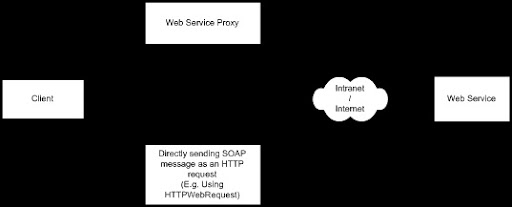
Fig 1. Various ways to invoke a Web Service.
System Requirements
In this article you will create an example using Visual Studio 2003; however you can also implement same solution in Visual Studio 2005 (.NET Framework 2.0). This article has sample code and requires following to run the code:
- A web server running on Windows XP professional, Windows 2000 or later
- The .NET Framework version 1.x
- VS.NET 2003
Installing and Compiling the Sample Code
The attached sample code has following two different solutions.
- Sample CurrencyHandler Web service code
- The WSInvoker assembly and TestClient console application.
In order to run CurrencyHandler web service you need to declare it in the IIS. The WSInvoker assembly and TestClient are combined in one solution and can be run directly.
Note that the attached code is slightly different than explained in this article and has additional comments and error handling.
Why not Web Service Proxy?
As discussed earlier, a web service proxy can be created using WSDL. WSDL defines a contract that lets a client invoke a remote service by describing the web service in terms the client understands.
Although the WSDL specification describes only HTTP for communicating with endpoints, many vendors supports additional protocols (such as JMS - Java Messaging Service). There are several occasions where WSDL.exe or Visual Studio cannot generate a web proxy, for example - the web service in Axis or something similar,
In .NET you can use proxy class with SOAP handlers to perform pre or post operations on SOAP messages, e.g. SOAP body encryption/compression. However for few clients it’s very difficult to write a code using SOAP handlers to implement custom SOAP formats. In such scenarios web service proxy is either obsolete or not much helpful.
To overcome proxy generation problems and to invoke web service you can send entire SOAP message as an HTTP request. In order to do that the WebRequest class provides necessary infrastructure. Normally this approach has several advantages/disadvantages compare to the web service proxy class which is illustrated in following table.
Sending SOAP as HTTP request Easy to use with complex SOAP request which has SOAP body encryption/compression or non-standard WSDL formats. One time code to invoke any web service. Require additional coding for creating complete SOAP message. Better approach if you are changing your service description often. | Using Web Services Proxy class Requires complex SOAP Handler programming to extract and encrypt the SOAP body. May not work with non-standard WSDL formats. Need to create a proxy for every web services. No additional coding – just create instance of proxy and then invoke the web method. Every time client needs a new proxy for changed service description. |
With both approach, it is possible to make asynchronous web requests.
Sending a SOAP message as an HTTP request
The example in this article uses the WebRequest class and its derived classes for sending a SOAP message as an HTTP request. This section covers some basics of the WebRequest and its derived classes.
The WebRequest class
The WebRequest class is the abstract base class which makes request/response for accessing data from the Internet. In order to make request to a web server it uses URI (Uniform Resource Identifier). Since this class is abstract class, the actual behavior of instances is controlled by the derived class. This class can be derived depending on what type of protocol (e.g. HTTP/FTP) you want to impalement with a web server. For example you can derive this class in the HttpWebRequest class to perform HTTP specific communication where as it can be derived in the FileWebRequest class to perform file transfer operations. Note that the actual behavior (HTTP or FTP) of WebRequest instances at run time is determined by the descendant class returned by WebRequest.Create() method.
Since example in this article sends SOAP message using HTTP, you'll see how the HttpWebRequest class can be used to communicate with a server.
The HttpWebRequest class
The HttpWebRequest class supports properties and methods defined in WebRequest class. In addition this class also has its own specific properties and methods which can be used to communicate with a server using HTTP protocol. In following section you'll see some information on the HttpWebRequest which is specific to our example. This will help you to understand the code easily.
Creating an instance of the HttpWebRequest class
In order to create instance of HttpWebRequest class do not use the HttpWebRequest constructor. Instead use the WebRequest.Create() method to initialize the new HttpWebRequest instance as shown below:
// Create WebRequest object using web service URL
WebRequest wReq = WebRequest.Create(sUrl);
// Using the WebRequest instance create HttpWebRequest object
HttpWebRequest httpReq = (HttpWebRequest) wReq ;
This class supports following properties specific to our example:
The Method Property
This is overridden property from the WebRequest class. This property gets or sets method for the request. The request can be POST or GET. In our example this property is set to POST since we are posting the data to a web server.
httpReq.Method = "POST";
The ContentType Property
This is overridden property from WebRequest class and gets or sets the value of the Content-type HTTP header. This property determines the media type of the request. Since the web service request is SOAP envelope XML, this property is set to "text/xml”.
httpReq.ContentType = "text/xml";
The Headers Property
This is also overridden property from the WebRequest class. This property has a collection of the name/value pairs that make up the HTTP headers. You can add a new pair in collection using the Add() method as shown:
// Add SOAP action in header
httpReq.Headers.Add ("SOAPAction: " + sSoapAction);
In our example, the SOAPAction HTTP request header field can be used to exactly identify the operation on which service is being invoked. The value of the SOAPAction header provides a hint about how SOAPAction can be used and should be a URI identifying the “extended intent”. The format of the SOAPAction header to be the service namespace, followed by a forward slash, followed by the name of the operation, or urn:Example/sayHello.
An HTTP client MUST use this header field when issuing a SOAP HTTP Request.
The HttpWebRequest class supports following methods specific to our example:
The GetResponse() method
The GetResponse() method is overridden from the WebRequest class. This method sends a request to an Internet resource and returns instance of a WebResponse. However if the request has already been initiated then the GetResponse() method completes the request and returns instance of a WebResponse.
The WebResponse class is the abstract base class and therefore client applications do not create WebResponse objects directly. Usually instances of WebResponse are created by calling the GetResponse() method on a WebRequest instance as in our example:
WebResponse wResp = null;
StreamReader strmRdr = null;
string sResult ;
try {
// Get the response
wResp = httpReq.GetResponse () ;
The GetResponseStream() method
This method is WebResponse base class method and returns the data stream from the Internet resource.
// Get the response stream
Stream respStrm = wResp.GetResponseStream () ;
Closing the connection
It is necessary to close the connection and frees system resources once the client receives response from the Internet resource. You can use either WebResponse.Close() method or Stream.Close() method to close the connection.
Creating the Sample Application
The sample application in this article has three different applications:
- The CurrencyHandler web service
- The generic assembly – WSInvoker, to send HTTP request to the web service
- The client application – WSTester, to invoke web service using the generic assembly
The CurrencyHandler web service
This article assumes that you are familiar with a web service in VS .NET. However in order to demonstrate our example you’ll create a simple web service named CurrencyHandler in Visual Studio 2003. The CurrencyHandler web service performs some tasks related to currency conversion and has two interfaces:
- The CurrencyRate interface, which takes country code and returns currency rate against US dollar. This interface eventually calls CurrencyRateForUSDollar function which performs currency conversion.
- The ProductPrice interface takes product code and country code and returns price of a product against US dollar.
Complete code for the CurrencyHandler web service is illustrated below:
using System;
using System.Collections;
using System.ComponentModel;
using System.Data;
using System.Diagnostics;
using System.Web;
using System.Web.Services;
namespace CurrencyHandler {
/// <summary>
/// The Converter service provides currency conversion services.
/// </summary>
[WebService(Namespace="http://example.asptoday.com/")]
public class Converter : System.Web.Services.WebService {
#region Component Designer generated code
/// <summary>
/// Default constructor
/// </summary>
public Converter() {
InitializeComponent();
}
//Required by the Web Services Designer
private IContainer components = null;
/// <summary>
/// Required method for Designer support - do not modify
/// the contents of this method with the code editor.
/// </summary>
private void InitializeComponent() {
}
/// <summary>
/// Clean up any resources being used.
/// </summary>
protected override void Dispose( bool disposing ) {
if(disposing && components != null) {
components.Dispose();
}
base.Dispose(disposing);
}
#endregion
/// <summary>
/// Returns Currency Rate for given country code
/// </summary>
[WebMethod]
public double CurrencyRate(string CountryCode) {
return CurrencyRateForUSDollar(CountryCode);
}
/// <summary>
/// Returns Product price in US dollar for given product and country code
/// </summary>
[WebMethod]
public double ProductPrice(int productCode, string CountryCode) {
double dProductPrice = -1;
switch (productCode) {
case 1:
dProductPrice = 10 * CurrencyRateForUSDollar(CountryCode);
break;
case 2:
dProductPrice = 20 * CurrencyRateForUSDollar(CountryCode);
break;
case 3:
dProductPrice = 30 * CurrencyRateForUSDollar(CountryCode);
break;
case 4:
dProductPrice = 40 * CurrencyRateForUSDollar(CountryCode);
break;
}
return dProductPrice;
}
/// <summary>
/// Returns currency rate in US dollar for given country
/// code. If country code is not present then this method returns -1.
/// </summary>
private double CurrencyRateForUSDollar(string CountryCode) {
double dCurrencyRate = -1;
switch (CountryCode) {
case "EUR": // EURO
dCurrencyRate = 0.779775;
break;
case "CAD": // Canadian Dollar
dCurrencyRate = 1.13020;
break;
case "GBP": // British Pound
dCurrencyRate = 0.533020;
break;
case "AUS": // Australian Dollar
dCurrencyRate = 1.30677;
break;
}
return dCurrencyRate;
}
}
}
In above example, the CurrencyRateForUSDollar() function performs currency conversion for only four countries with fixed currency conversion rate.
Note:
While writing web service, always make sure that you have given the default namespace for your web service. Purpose of the default namespace is to distinguish it from other services on the Web. However while invoking web service using HTTP request, the default namespace is used as SOAP action with method name. If you do not provide the default namespace then each SOAP action is created using the default URI - http://tempuri.org/. In such case SOAP action for web methods ProductPrice and CurrencyRate looks as shown below:
http://tempuri.org/ProductPrice
http://tempuri.org/CurrencyRate
Although the default namespace look like URLs, they need not point to actual resources on the Web. The default namespace can be changed using the WebService attribute's Namespace property as shown:
[WebService(Namespace="http://example.asptoday.com/")]
public class Converter : System.Web.Services.WebService {
In above example http://example.asptoday.com/ is the default namespace. SOAP action URI for web methods ProductPrice and CurrencyRate looks as shown below:
http://example.asptoday.com/ProductPrice
http://example.asptoday.com/CurrencyRate
The generic assembly – WSInvoker
While writing the web service invoker you’ll create a generic assembly - WSInvoker which can be used with any web service. In order to invoke web service using the HTTPWebRequest object we need following three parameters:
- Web Service URL
- SOAP Action
- SOAP Envelope
In our example you can also access SOAP action and SOAP envelope by browsing the web service URL. To do that browse the CurrencyHandler web service it looks as shown below:
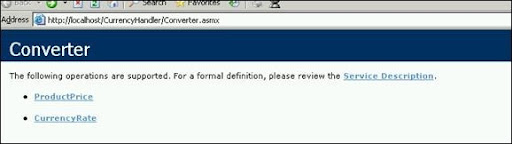
Fig 2. CureencyHandler web service in Internet Explorer
The above page shows links for various interfaces and service description. If you click on ProductService then you will get the following page:
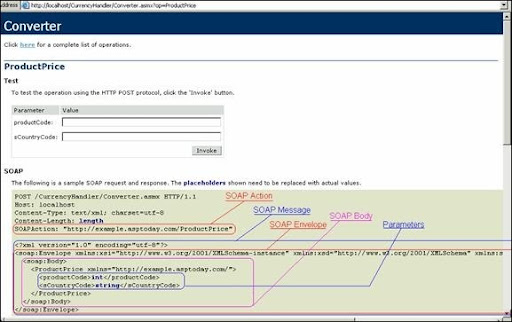
Fig 3. SOAP details for CureencyHandler web service
To create WSInvoker assembly, create a new assembly project named ‘WSInvoker’ in VS2003 and rename default class Class1 to ‘Invoke’.
Add the following namespaces which are require to perform HTTP post and to handle request/response streams.
using System;
using System.Net;
using System.IO;
using System.Text ;
Next change the default constructor of Invoke class as shown below. The constructor accepts web service URL which is used for sending SOAP request.
namespace WSInvoker {
public class Invoke {
// Holds web service URL
private string m_sURL;
/// <summary>
/// Constructor for Invoke class.
/// </summary>
public Invoke(string sUrl) {
m_sURL = sUrl;
}
Next add a method SendSoapMessage which will take two parameters one for SOAP action URI and another SOAP message as shown:
public string SendSoapMessage(string sSoapAction,string sSoapMsg) {
The SendSoapMessage method creates necessary objects required to post a request and to get a response from the web service. The WebRequest object instance is created using the Create method and web service URL.
// Create WebRequest object using web service URL
WebRequest wReq = WebRequest.Create(m_sURL);
As discussed earlier, the WebRequest is an abstract class that can be used to create an instance of the HTTPWebRequest class.
// Using the WebRequest instance create HttpWebRequest object
HttpWebRequest httpReq = (HttpWebRequest) wReq ;
Next set properties for Method, Content Type and add SOAP Action in the header.
// Assign Method as "Post" since we are posting the request
httpReq.Method = "POST";
// Cintenttype for SOAP envelope id text/xml
httpReq.ContentType = "text/xml";
// Add SOAP action in header
httpReq.Headers.Add ("SOAPAction: " + sSoapAction);
The SOAP message then converted in to stream using StreamWriter object. The GetRequestStream () method initiates a request to send data to the Internet resource and Write() method actually writes stream to underlying HTTP connection.
// Get the request stream
Stream sendStream = httpReq.GetRequestStream ();
/// 2.0 put the Request text into the request stream
// create a StreamWriter object and write SOAP envelope string into it
StreamWriter strmWrtr = new StreamWriter(sendStream);
strmWrtr.Write (sSoapMsg);
strmWrtr.Close ();
The abstract WebResponse class can be used to process response. Since WebResponse is abstract class client applications do not create WebResponse objects directly, they are created by calling the GetResponse() method on a WebRequest instance as shown:
// 3.0 make the request and get the response.
WebResponse wResp = null;
StreamReader strmRdr = null ;
string sResult = string.Empty;
try {
// Get the response
wResp = httpReq.GetResponse () ;
Further the WebResponse instance is used with GetResponseStream () method to read the response stream. Finally the stream is converted back in to string to get XML formatted web response.
// Get the response stream
Stream respStrm = wResp.GetResponseStream () ;
// Create StreamReader to read the stream
strmRdr = new StreamReader (respStrm) ;
// read the stream in to the string
sResult = strmRdr.ReadToEnd () ;
}
catch (WebException wex) {
throw wex;
}
catch (Exception ex) {
throw ex;
}
// 4,0 Finally return the xml response in string format
return sResult ;
}
Once you complete coding compile the code and create WSInvoker assembly.
Note:
Since we are posting SOAP envelope as an HTTP Post, consideration of using SOAP handlers at client side is not applicable. SOAP handlers at client side are useful when you use proxy. SOAP Handlers are used to perform additional processing on SOAP envelope (e.g. SOAP body encryption, inserting SOAP header etc.) However with HTTP post approach we have full control on SOAP envelope and therefore it easy to use direct HTTP post instead of SOAP handlers. Note that SOAP handlers at server side won’t affect if you use any method for invoking web service.
The client application – WSTester
To test WSInvoker generic assembly we need to create a web service client. Note that programming for web service client using direct HTTP module is different than using web service proxy. With web service proxy you can easily invoke web service by using proxy instance and web method name. However the client for invoking web service using direct HTTP call requires a complete SOAP message. In this section you will see how to create a client application which will use WSInvoker assembly to invoke web service using HTTP post.
To start create TestClient console application in VS 2003. Rename the default Class1 to Tester and add reference to WSInvoker assembly. While using HTTP post method you need to send complete SOAP message to web service. However most of SOAP message is constant except the SOAP body, which changes according to web method and parameters. Therefore in our example we have declared most of the SOAP message part as constant strings.
In the following code, the SOAP_START string has beginning of the SOAP message whereas SOAP_END has the string which is required to complete SOAP message. The SOAP body is dynamic and will be seated within SOAP_START and SOAP_END strings. Since web service URL is fixed it is also declared as constant.
using System;
namespace TestClient {
/// <summary>
/// Test Class for invoking Web Service using WSInvoker assembly.
/// </summary>
class Tester {
// Starting SOAP start message
private const string SOAP_START = "<?xml version=\"1.0\" encoding=\"utf-8\"?>" +
"<soap:Envelope xmlns:xsi=\"http://www.w3.org/2001/XMLSchema-instance\" xmlns:xsd=\"http://www.w3.org/ 2001/XMLSchema\" xmlns:soap=\"http://schemas.xmlsoap.org/soap/envelope/\">" +
"<soap:Body>";
// Ending SOAP message
private const string SOAP_END = "</soap:Body></soap:Envelope>";
// Web service URL
private const string WS_URL = "http://localhost/CurrencyHandler/Converter.asmx";
In the Main() method the SOAP action URI indicates which web service method you want to invoke. In this example you will first invoke CurrencyRate() method and then the ProductPrice() method.
To start define SOAP action URI for CurrencyRate() method and then create SOAP body.
[STAThread]
static void Main(string[] args) {
try {
/// 1. Invoking CurrencyRate method
// Define SOAP action (decides which method to invoke)
string sSOAPAction = "http://example.asptoday.com/CurrencyRate";
// Create SOAP Body
string SOAP_Body = "<CurrencyRate xmlns=\"http://example.asptoday.com/\">" +
"<CountryCode>GBP</CountryCode>" +
"</CurrencyRate>";
Note: The biggest advantage of this method is you can perform various operations like compression and encryption on SOAP body very easily. You can call your compression or encryption routine before creating complete SOAP message.
Next the complete SOAP message is created using SOAP constants and SOAP body.
// Complete SOAP message
string sSOAPMessage = SOAP_START + SOAP_Body + SOAP_END;
Finally an instance of WSInvoker is created by passing web service URL and then SendSoapMessage() method is invoked by passing SOAP action URI and SOAP message.
// Invoke web service by using WSInvoker
WSInvoker.Invoke oInvoke = new WSInvoker.Invoke(WS_URL);
Console.WriteLine ("Invoking CurrencyRate method. Output Response is - \n");
// Send SOAP message and print the response
Console.WriteLine (oInvoke.SendSoapMessage(sSOAPAction,sSOAPMessage));
In similar fashion the ProductPrice method is called and output response is displayed on console.
// Define SOAP action (decides which method to invoke)
sSOAPAction = "http://example.asptoday.com/ProductPrice";
// Create SOAP Body for ProductPrice nethod
SOAP_Body = "<ProductPrice xmlns=\"http://example.asptoday.com/\">" +
"<productCode>2</productCode>" +
"<CountryCode>CAD</CountryCode>" +
"</ProductPrice>";
// Complete SOAP message
sSOAPMessage = SOAP_START + SOAP_Body + SOAP_END;
Console.WriteLine("\n");
Console.WriteLine ("Invoking ProductPrice method. Output Response is - \n");
// Send SOAP message and print the response
Console.WriteLine (oInvoke.SendSoapMessage(sSOAPAction,sSOAPMessage));
Lastly compile the project and run the application. The output of TestClient application looks as shown below:
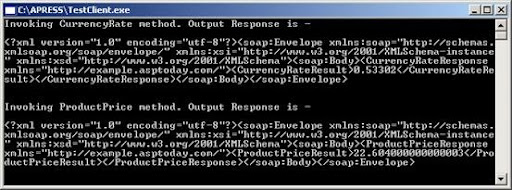
Fig 4.Output of TestClient
Further Work
You can extend this application to send compressed or encrypted SOAP message to the web service. In such case you need to write SOAP handler at web service side to decompress and decrypt SOAP body. If web service is also sending compressed and/or encrypted message then you can write code to decompress/decrypt at client side.
Conclusion
In this article you have seen how to invoke web service using direct HTTP post. This method is useful where traditional SOAP proxy is not useful or when you want to send encrypted/compressed SOAP body without using SOAP handler. The generic WSInvoker assembly can be used with any web service without need of proxy service.
May 09, 2005
Windows Server 2003 - issue with web service event logging.
I came across one problem when web service tried to enter log in windows event log, an exception occurred related to write access.
This problem caused because of default ACL settings in Windows server 2003. The ACL (Access Control Layer) prohibits web service to write log entries.
This problem can be solved by changing ACL settings in registry:
HKEY_LOCAL_MACHINE/System/CurrentControlSet/Application
Locate the CustomSD key and add the following string to the existing value:
(A;;0x0002;;;AU)
Check this KB article too...
November 12, 2004
DB2 as a Web Services Consumer - Invoking a Web service from a DB2 SQL Statement
This is one more article by me which was published on asp today.
Abstract
DB2 Universal Database (UDB) V8.2 has strong support for Web services and can act as a Web services provider as well as consumer. As a Web service consumer, you can invoke the Web service from within Structured Query Language (SQL) statements by invoking a set of user-defined functions (UDFs). This article explains how to invoke a simple Web service from a DB2 SQL statement.
Introduction
In this article you will see how DB2 V8.2 acts as a Web services consumer. As a Web services consumer, SQL statements in DB2 can directly invoke the Web services method which resides on the other server. This eliminates the need for a separate module for invoking the Web service after receiving data from a SQL statement. It also saves your effort because data can be manipulated within the context of an SQL statement before it is returned to the client application.
To simplify this lets take a scenario where the publishing company has several stockiest worldwide. The central office of the publishing company wants to find out available stock of the book at various locations worldwide. In traditional approach the first step is to get required data from the local database, second is to get the stock of a book from every location using the web service and ISBN number and third present all the data to the user. The same has illustrated in following Figure 1:
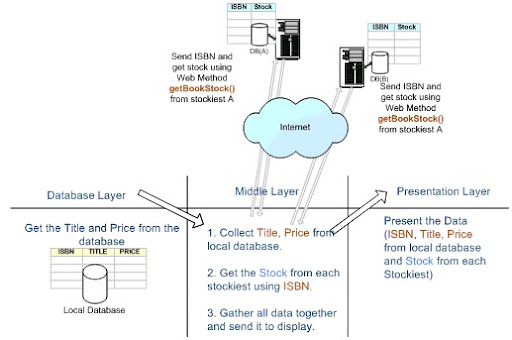
Figure 1. Traditional Approach to retrieve data from remote location.
The same scenario can be represented using DB2 as web service consumer as shown in Figure 2.
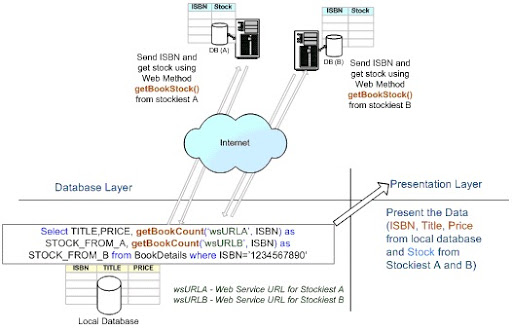
Figure 2. DB2 as a Web Service Consumer.
By comparing two figures you will observe that when you use DB2 as a web service consumer there is no need of middle layer or code logic to invoke the web services. In figure 2, the getBookCount () user defined function itself calls web services and returns the stock data. This approach helps to improve productivity and maintainability of the product. In next section of article, you will see how to call a web service from the SQL statement.
System Requirements
In order to demonstrate DB2 as a Web services Consumer you need the following products:
- DB2 UDB V8.2
You can download latest trial version of DB2 from http://www-306.ibm.com/software/data/
- To create Web services you need Microsoft .NET 1.1 and to deploy the web service you need IIS 5.0 or higher on Windows operating System.
Note: You can create Web services using any platform/technologies. For demonstrating coexistence between different technologies I have developed Web services using Microsoft .NET 1.1.
- WebSphere 5.0 or higher (Optional)
WebSphere 5.0 or higher can be used to generate user defined functions(UDFs). WebSphere 5.x has inbuilt wizard to generate UDF to consume web service. This article doesn’t demonstrate generating UDF using WebSphere.
You can download the latest trial version of WebSphere at http://www-306.ibm.com/software/websphere/
Installing and Compiling the Sample Code
Assumptions:
- The makeBookDB.bat assumes that all database related files are stored in C:\Apress folder while running the scripts.
- While executing the DB2 related statements, userid and password are not supplied. Therefore DB2 uses default (logged) users authentication and creates the schema accordingly. If you want to specify different userid and password then you need to change database related scripts in attached code.
- The bookStock web service is created and accessible using following URL:
http://localhost/bookStock/stock.asmx
The attached sample code demonstrate how to use the getBookStock() web method in the DB2 SQL statement. Details of each sample file have given below:
A. bookStock.zip – code for .NET web service
B. The database.zip consists following three files:
I. makeBookDB.bat – This batch file has everything from creating the BOOKINFO database to running a sample SQL statement which invokes bookStock Web Service.
II. bookInfo.db2 – The batch file calls this file to perform database and table related operations.
III. BookStockFromStockiest.udf –This file has User Defined Function (UDF) and the batch file calls this file to register it.
The makeBookDB.bat batch file performs following tasks:
1. Drops the connection to the database if exists already. (This is required if you are running batch file again in same command window.)
2. Drop BOOKINFO database if already exist.
Note: Ignore any exception from step 1 and 2 if you are running script first time since you will not have connection as well as BOOKINFO database.
3. The makeBookDB.bat then calls bookInfo.db2 file from c:\Apress. The bookInfo.db2 file performs following tasks:
a. It creates and connects to the BOOKINFO database.
b. It creates BOOKDETAILS table.
c. Inserts sample data in BOOKDETAILS table.
4. Enables BOOKINFO database for DB2 XML extender using dxxadm command.
5. Enables DB2 web service consumer using the db2enable_soap_udf command.
6. Registers the UDF from c:\apress\BookStockFromStockiest.udf.
7. Finally executes the SQL statement which invokes the getBookStock() web services method.
To install the web service code and to perform database related tasks follow the procedure given below:
- Deploy the web service by creating a bookStock virtual folder. The service should be accessible by invoking the URL
http://localhost/bookStock/stock.asmx
- Unzip the database.zip file in c:\. (All unzipped 3 files should be present in C:\Apress.)
- Open DB2 Command Window using “Programs->IBM DB2->Command Line Tools->Command Window”. This opens command window as "C:\Program Files\IBM\SQLLIB\BIN\>"
- Run the makeBookDB.bat on command window as:
C:\Program Files\IBM\SQLLIB\BIN\> C:\apress\ makeBookDB.bat
- At the end, the makeBookDB.bat script executes the SQL statement which uses a UDF function to invoke a Web Service.
Article Structure
This article is divided in three sections to explain how DB2 acts as a Web Service consumer:
- Introduction to DB2 and Web services
- Creating simple Web services in Microsoft .NET
- Creating DB2 UDF (User Defined Function) using WebSphere for consuming .NET Web services.
Introduction to DB2 and Web Services
In this section you will see:
- DB2 V8.2 and Web services
- DB2 V8.2 as a Web services Consumer
- The prerequisites for consuming Web services in DB2 V8.2
DB2 V8.2 and Web services
DB2 UDB V8.2 introduced strong support for Web services.DB2 V8.2 can act as Web services provider as well as consumer. As a Web services provider, DB2 exposes web service by which you can execute stored procedure, UDF or SQL statements by using Web services Object Runtime Framework (WORF), also known as Document Access Definition Extension (DADX) files. DB2 exposes SQL statements or stored procedure data as a Web services using DADX file. The Web services Object Runtime Framework (WORF) and Document Access Definition Extension (DADX) are the part of DB2 8.x.
As a Web services consumer, you can invoke Web services from within Structured Query Language (SQL) statements by invoking a set of user-defined functions (UDFs) which actually invoke the web services.
This article is intended to explain how DB2 act as a Web services consumer.
DB2 as a Web Services consumer
DB2 V8.2 comes with the ability to invoke Web services from within Structured Query Language (SQL) statements. This can be achieved by invoking set of User-Defined Functions (UDFs) that provide a high-speed client Simple Object Access Protocol (SOAP) over Hypertext Transfer Protocol (HTTP) interface to access Web services. You can call these functions directly from SQL statements. Using SQL statement to access Web services data can save your effort because data can be manipulated within the context of an SQL statement before it is returned to the client application.
For example, the following SQL statement shows how to use the User Defined Function (UDF) getBookCount () to get the book stock. The getBookCount () function is registered and published as User Defined Function (UDF) on the DB2 server and returns book stock from inputted ISBN number.
Select TITLE,PRICE, getBookCount('wsURLA', ISBN) as STOCK_FROM_A, getBookCount('wsURLB',ISBN) as STOCK_FROM_B from BookDetails where ISBN='1234567890'
The SELECT statement passes the ISBN to the getBookCount () function. In particular, the DB2 function getBookCount () does the following actions:
- It composes a SOAP request
- It posts the request to the service endpoint
- It receives the SOAP response
- It returns the content of the SOAP body
Prerequisites for DB2 Database to invoke Web services in a SQL statement
Following are the prerequisites for DB2 database to invoke or consume a Web services in the DB2 SQL statement.
DB2 V8.2 database should be enabled for DB2 XML extender The DB2 XML Extender is an integrated component of DB2 and enables a wide range of new applications through the following functions:
- Extract XML elements and attributes into traditional SQL data types.
- Store an entire XML document within a column value
- Query within a XML document
- Create XML documents from one or more tables
- Update one or more tables from a XML document
- Compatible with the powerful search functions of DB2 Net Search Extender for searching one or more sections within a set of XML documents.
In order to use DB2 as web service consumer, make sure that the database is enabled for XML extender.
The dxxadm command can be used in following syntax to enable DB2 XML Extender as shown below. The userid and password are optional in this command and if not supplied it takes credentials for the current logged user:
dxxadm enable_db dbname -l userid -p password
E.g. In our sample example you are enabling BOOKINFO database for DB2 XML Extender as shown below:
C:\Program Files\IBM\SQLLIB\BIN\>dxxadm enable_db BOOKINFO
You can use the sysfunctions table in your database to check whether the database is enabled for XML extender or not.
The sysfunctions table consists of XML related functions if database is enabled for XML extender. Therefore by using following SQL statement you can verify whether the database is enabled for XML extender or not.
select name from sysibm.sysfunctions where name like ‘XML%’
If database is enabled for XML extender then above SQL statement should return some function names starting with XML.
The Web service consumer must be installed and enabled
To enable web service consumer use the db2enable_soap_udf command. This command has following syntax
db2enable_soap_udf -n dbName [-u uID] [-p password] [-force]
e.g.
db2enable_soap_udf -n BOOKINFO -force
To invoke Web services in SQL statement, first you need a Web service and secondly a UDF to invoke that Web service. In particular, you will go through the following tasks:
- Create and publish Web services
- Create User Defined Function (UDF)
- Register and Use UDF in SQL statement
Creating and Publishing Web services
In order to demonstrate how to invoke web service from the DB2 SQL statement you need to create a sample web service. In our example you will create a simple web service to get the stock of a book. The web method in web service will take the ISBN of a book and it will return number of copies available in the stock.
To start, open Visual Studio .NET and create a new ASP .NET Web Service project in C#. Name the project as bookStock and rename the default Service1.asmx as stock.asmx.
Create getBookStock () web method and add the following code in stock.asmx.cs. The getBookStock () method here takes ISBN of the book as input parameter and returns number of books available in the stock. To avoid complexity, we are using simple switch-case logic for returning books available in the stock. In actual case the code will return the available stock from database. The ISBN numbers which you are using in the web method are present in BOOKDETAILS database. The logic will return 0 if there is mismatch for ISBN.
[WebMethod]public int getBookStock(string isbn) { int intStock = 0; switch (isbn) { case "0738490555": intStock = 121; break; case "0738491497": intStock = 321; break; case "0738498246": intStock = 481; break; case "1590592697": intStock = 193; break; case "1590593456": intStock = 256; break; } return intStock; }
Build and test the Web service by running the project. Entire WSDL for above service looks as shown below:
<?xml version="1.0" encoding="utf-8"?><wsdl:definitions xmlns:http="http://schemas.xmlsoap.org/wsdl/http/" xmlns:soap="http://schemas.xmlsoap.org/wsdl/soap/" xmlns:s="http://www.w3.org/2001/XMLSchema" xmlns:soapenc="http://schemas.xmlsoap.org/soap/encoding/" xmlns:tns="http://tempuri.org/" xmlns:tm="http://microsoft.com/wsdl/mime/textMatching/" xmlns:mime="http://schemas.xmlsoap.org/wsdl/mime/" targetNamespace="http://tempuri.org/" xmlns:wsdl="http://schemas.xmlsoap.org/wsdl/"> <wsdl:types> <s:schema elementFormDefault="qualified" targetNamespace="http://tempuri.org/"> <s:element name="getBookStock"> <s:complexType> <s:sequence> <s:element minOccurs="0" maxOccurs="1" name="isbn" type="s:string" /> </s:sequence> </s:complexType> </s:element> <s:element name="getBookStockResponse"> <s:complexType> <s:sequence> <s:element minOccurs="1" maxOccurs="1" name="getBookStockResult" type="s:int" /> </s:sequence> </s:complexType> </s:element> </s:schema> </wsdl:types> <wsdl:message name="getBookStockSoapIn"> <wsdl:part name="parameters" element="tns:getBookStock" /> </wsdl:message> <wsdl:message name="getBookStockSoapOut"> <wsdl:part name="parameters" element="tns:getBookStockResponse" /> </wsdl:message> <wsdl:portType name="stockSoap"> <wsdl:operation name="getBookStock"> <wsdl:input message="tns:getBookStockSoapIn" /> <wsdl:output message="tns:getBookStockSoapOut" /> </wsdl:operation> </wsdl:portType> <wsdl:binding name="stockSoap" type="tns:stockSoap"> <soap:binding transport="http://schemas.xmlsoap.org/soap/http" style="document" /> <wsdl:operation name="getBookStock"> <soap:operation soapAction="http://tempuri.org/getBookStock" style="document" /> <wsdl:input> <soap:body use="literal" /> </wsdl:input> <wsdl:output> <soap:body use="literal" /> </wsdl:output> </wsdl:operation> </wsdl:binding> <wsdl:service name="stock"> <documentation xmlns="http://schemas.xmlsoap.org/wsdl/" /> <wsdl:port name="stockSoap" binding="tns:stockSoap"> <soap:address location="http://localhost/bookStock/stock.asmx" /> </wsdl:port> </wsdl:service></wsdl:definitions>
Creating User Defined Function (UDF) to call Web services.
In this section you will see:
- Creating a UDF function to consume Web services.
- Registering UDF on DB2
- Calling Web service from DB2 SQL statement.
DB2 requires a User Defined Function (UDF) to consume the Web services and to process the response. In our example you will create getBookStock() function to invoke the bookStock Web service discussed above.
You can manually write UDF function using notepad or any text editing tool but sometimes it’s complex. To make it easy you can use WebSphere 5.1 or higher for creating UDFs automatically. The WebSphere 5.x generates UDF automatically using inbuilt Web Service User-Defined Function Wizard by providing a WSDL of the Web services.
Following is code snippet for the getBookCount() UDF.
CREATE FUNCTION getBookCount( wsURL VARCHAR(200), parameters_isbn VARCHAR(100) ) RETURNS INTEGER LANGUAGE SQL CONTAINS SQL EXTERNAL ACTION NOT DETERMINISTIC RETURN with soap_input (in) AS (VALUES varchar( '<m:getBookStock xmlns:m="http://tempuri.org/" SOAP-ENV:encodingStyle="http://schemas.xmlsoap.org/soap/encoding/">' '<m:isbn>' parameters_isbn '</m:isbn>' '</m:getBookStock>') ), soap_output(out) AS (VALUES db2xml.soaphttpv( wsURL, 'http://tempuri.org/getBookStock', (SELECT in FROM soap_input)) ) select db2xml.extractInteger(db2xml.xmlclob(x.out), '//getBookStockResult') from soap_output x !
In above code, the getBookCount () function takes ISBN as input parameter and returns total number of books in the stock. The getBookCount () function also takes web service URL as an input parameter. The UDF can be made more flexible by providing web service URL as an input parameter. Following figure shows various components of the getBookCount UDF.
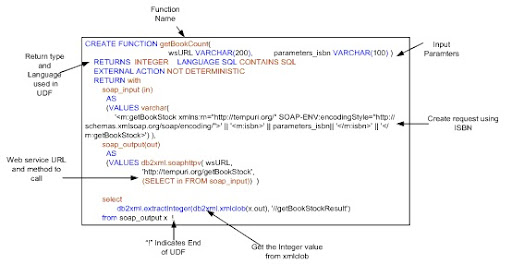
Figure 3. UDF described.
Save the UDF after editing it in notepad. Note that you can use any extension for file name and you can store file locally in any folder.
Registering and Using UDF in SQL statement
If you are using WebSphere then it automatically registers UDF in DB2 database.
To register UDF manually in database use the db2 command as shown:
db2 -td! -f c:\taxerUDF.db
In above command the “-td!” tells the command line processor to define and to use “!” as the end of UDF character where as “-f” indicates that the command has to perform on a file.
Finally invoke the UDF function using SQL as shown in the following SQL statement.
select isbn,price, getBookCount ('http://localhost/bookStock/stock.asmx', isbn) AS STOCK_FROM_A from bookdetails
Above command returns all the stock of books and the output is shown below:
db2 => select isbn,price, getBookCount ('http://localhost/bookStock/stock.asmx', isbn) AS STOCK_FROM_A from bookdetails
ISBN PRICE STOCK_FROM_A
---------- --------- ------------
1590593456 59.99 256
1590592697 44.99 193
0738498246 69.00 481
0738491497 46.00 321
0738490555 39.00 121
5 record(s) selected.
To get the stock for particular book you can modify above SQL statement using where clause as:
select isbn,price, getBookCount ('http://localhost/bookStock/stock.asmx', isbn) AS STOCK_FROM_A from bookdetails where isbn ='1590592697'
The output of the above statement is:
db2 => select isbn,price, getBookCount ('http://localhost/bookStock/stock.asmx', isbn) AS STOCK_FROM_A from bookdetails where isbn ='1590592697'
ISBN PRICE STOCK_FROM_A
---------- --------- ------------
1590592697 44.99 193
1 record(s) selected.
If you want to use UDF function without select statement then you can use it as:
values getbookcount ('http://localhost/bookStock/stock.asmx', '1590593456')
The output of above statement will be:
db2 => values getbookcount ('http://localhost/bookStock/stock.asmx', '1590593456')
1
-----------
256
1 record(s) selected.
The following example shows how to retrieve all the book stock from two stockiest assuming web service URLs exists:
select isbn,price,
getBookCount ('http://stockiestA/bookStock/stock.asmx', isbn) AS STOCK_FROM_A,
getBookCount ('http://stockiestB/bookStock/stock.asmx', isbn) AS STOCK_FROM_B
from bookdetails
The DB2 engine throws following error if web service does not exist or web server is down.
SQL0443N Routine "DB2XML.SOAPHTTPV" (specific name "SOAPHTTPVIVO") has
returned an error SQLSTATE with diagnostic text "Error during socket connect".
SQLSTATE=38309
Conclusion
In this article you saw how to invoke Web service from DB2 SQL statement. By invoking a web service from SQL statement saves your effort because data can be manipulated within the context of an SQL statement before it is returned to the client application. This increases productivity by reducing the development time/cost as well as easy for the maintenance.
September 04, 2004
Calling Web Service from VB6.0
Code for invoking WebService from VB6.0
txtReq.Text has complete SOAP enevlope (including SOAP body)
txtWSSchema.Text 'SOAP action URI (look WS test page for URI)
-------------------------------------------
Private Sub cmdRequest_Click()
Dim o As New MSXML2.XMLHTTP
On Error GoTo err_handler
o.open "POST", "http://localhost/MYWebServices/myws.asmx", False
o.setRequestHeader "Content-Type", "text/xml; charset=utf-8"
o.setRequestHeader "Connection", "close"
o.setRequestHeader "SOAPAction", txtWSSchema.Text 'SOAP action URI (look WS test page for URI)
o.send txtReq.Text
txtResponseHeaders.Text = o.getAllResponseHeaders
txtResponse.Text = o.responseText
err_handler:
If Err.Number <> 0 Then MsgBox "Error " & Err.Number &amp; ": " & Err.Description
End Sub
July 31, 2004
Working on WORF
I am working on my fifth book on DB2 and .NET with Whei Chen. I sent following stuff for review -
First section- 1.1 explains WORF and how to create WORF service on Apache Tomcat Server whereas second part-1.2 explains how to consume that service in .NET client. First part is related to JAVA environment but not uses JAVA code any where whereas second part is related to .NET.
September 23, 2002
SOAP (Web service) using VB and ASP
Originally written on 9/23/2002
VB DLL code: (soapTest.vbp class- clsSOAP.cls)
Public Function getData(id As Long, name As String) As String
getData = id & " " &amp;amp;amp;amp; name & "!"
End Function
ASP Code: (Facade) (SoapTest1.asp)
< %@ LANGUAGE=VBScript %>
< % Option Explicit On Error Resume Next Response.ContentType = "text/xml" Dim SoapServer If Not Application("SoapTest1Initialized") Then Application.Lock If Not Application("SoapTest1Initialized") Then Dim WSDLFilePath Dim WSMLFilePath WSDLFilePath = Server.MapPath("SoapTest1.wsdl") WSMLFilePath = Server.MapPath("SoapTest1.wsml") Set SoapServer = Server.CreateObject("MSSOAP.SoapServer") If Err Then SendFault "Cannot create SoapServer object. " & Err.Description SoapServer.Init WSDLFilePath, WSMLFilePath If Err Then SendFault "SoapServer.Init failed. " & Err.Description Set Application("SoapTest1Server") = SoapServer Application("SoapTest1Initialized") = True End If Application.UnLock End If Set SoapServer = Application("SoapTest1Server") SoapServer.SoapInvoke Request, Response, "" If Err Then SendFault "SoapServer.SoapInvoke failed. " & Err.Description Sub SendFault(ByVal LogMessage) Dim Serializer On Error Resume Next ' "URI Query" logging must be enabled for AppendToLog to work Response.AppendToLog " SOAP ERROR: " & LogMessage Set Serializer = Server.CreateObject("MSSOAP.SoapSerializer") If Err Then Response.AppendToLog "Could not create SoapSerializer object. " & Err.Description Response.Status = "500 Internal Server Error" Else Serializer.Init Response If Err Then Response.AppendToLog "SoapSerializer.Init failed. " & Err.Description Response.Status = "500 Internal Server Error" Else Serializer.startEnvelope Serializer.startBody Serializer.startFault "Server", "The request could not be processed due to a problem in the server. Please contact the system admistrator. " & LogMessage Serializer.endFault Serializer.endBody Serializer.endEnvelope If Err Then Response.AppendToLog "SoapSerializer failed. " & Err.Description Response.Status = "500 Internal Server Error" End If End If End If Response.End End Sub %>
WSML Code: (SoapTest1.wsml) Replace # with <
#!-- Generated 09/23/02 by Microsoft SOAP Toolkit WSDL File Generator, Version 1.02.813.0 -->
#?xml version='1.0' encoding='UTF-8' ?>
#servicemapping name='SoapTest1'>
#service name='SoapTest1'>
#using PROGID='soapTest.clsSOAP' cachable='0' ID='clsSOAPObject' />
#port name='clsSOAPSoapPort'>
#operation name='getData'>
#execute uses='clsSOAPObject' method='getData' dispID='1610809344'>
#parameter callIndex='1' name='id' elementName='id' />
#parameter callIndex='2' name='name' elementName='name' />
#parameter callIndex='-1' name='retval' elementName='Result' />
#/execute>
#/operation>
#/port>
#/service>
#/servicemapping>
WSDL Code: (SoapTest1.wsdl) Replace # with <
#?xml version='1.0' encoding='UTF-8' ?>
#!-- Generated 09/23/02 by Microsoft SOAP Toolkit WSDL File Generator, Version 1.02.813.0 -->
#definitions name ='SoapTest1' targetNamespace = 'http://tempuri.org/wsdl/'
xmlns:wsdlns='http://tempuri.org/wsdl/'
xmlns:typens='http://tempuri.org/type'
xmlns:soap='http://schemas.xmlsoap.org/wsdl/soap/'
xmlns:xsd='http://www.w3.org/2001/XMLSchema'
xmlns:stk='http://schemas.microsoft.com/soap-toolkit/wsdl-extension'
xmlns='http://schemas.xmlsoap.org/wsdl/'>
#types>
#schema targetNamespace='http://tempuri.org/type'
xmlns='http://www.w3.org/2001/XMLSchema'
xmlns:SOAP-ENC='http://schemas.xmlsoap.org/soap/encoding/'
xmlns:wsdl='http://schemas.xmlsoap.org/wsdl/'
elementFormDefault='qualified'>
#/schema>
#/types>
#message name='clsSOAP.getData'>
#part name='id' type='xsd:int'/>
#part name='name' type='xsd:string'/>
#/message>
#message name='clsSOAP.getDataResponse'>
#part name='Result' type='xsd:string'/>
#part name='id' type='xsd:int'/>
#part name='name' type='xsd:string'/>
#/message>
#portType name='clsSOAPSoapPort'>
#operation name='getData' parameterOrder='id name'>
#input message='wsdlns:clsSOAP.getData' />
#output message='wsdlns:clsSOAP.getDataResponse' />
#/operation>
#/portType>
#binding name='clsSOAPSoapBinding' type='wsdlns:clsSOAPSoapPort' >
#stk:binding preferredEncoding='UTF-8'/>
#soap:binding style='rpc' transport='http://schemas.xmlsoap.org/soap/http' />
#operation name='getData' >
#soap:operation soapAction='http://tempuri.org/action/clsSOAP.getData' />
#input>
#soap:body use='encoded' namespace='http://tempuri.org/message/'
encodingStyle='http://schemas.xmlsoap.org/soap/encoding/' />
#/input>
#output>
#soap:body use='encoded' namespace='http://tempuri.org/message/'
encodingStyle='http://schemas.xmlsoap.org/soap/encoding/' />
#/output>
#/operation>
#/binding>
#service name='SoapTest1' >
#port name='clsSOAPSoapPort' binding='wsdlns:clsSOAPSoapBinding' >
#soap:address location='http://127.0.0.1/soapListen/SoapTest1.ASP' />
#/port>
#/service>
#/definitions>
SOAP Client Code:
Private Sub Command1_Click()
Dim o As New soapClient
o.mssoapinit "http://localhost/soaplisten/soaptest1.wsdl"
MsgBox CStr(o.GetData(2, "b"))
End Sub